
Custom Config
Custom configs let you route a copied file to a specific Blender operator with specific properties.
Add A Config
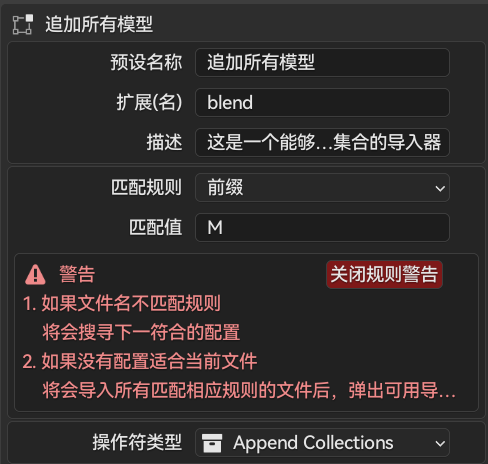
Open the Super IO preferences and add a custom import/export item. A config usually contains:
- Name and prompt text shown in Super IO menus.
- File extension, such as
obj,blend, orpng. - IO type: import or export.
- Blender operator ID, such as
wm.obj_importorwm.stl_export. - Optional properties passed to the Blender operator.
- Optional match rules for filename prefix, suffix, or other supported rules.
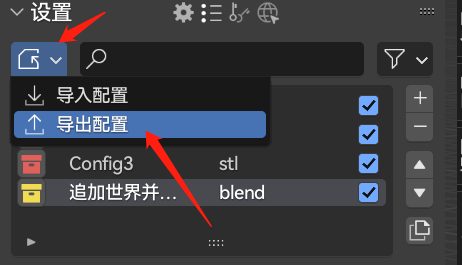
Import And Export Config JSON
Super IO can export custom configs to JSON and import them again later.
In Super IO 2.x, this JSON format is versioned. The extension also keeps a persistent JSON configuration file outside Blender preferences, which makes future migrations easier.
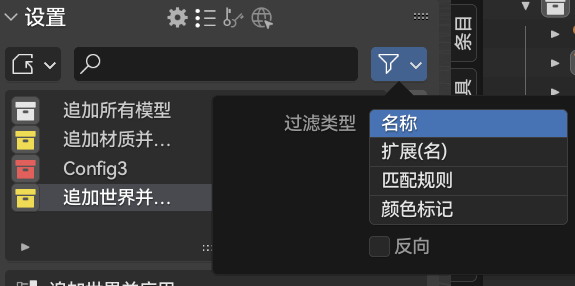
Search And Match
The config list can be filtered by name, extension, rule, color tag, and IO type.
Example: Blend Material Import
For a file named M_IamMaterial.blend, you can make a preset that recognizes material blend files:
- Add a new config.
- Set the extension to
blend. - Set the match rule to prefix.
- Set the match value to
M_. - Set the operator to the blend material import operator.
Now files starting with M_ can use the material import preset without asking you to choose from every blend import option.